



Hello! Thought I'd post some projects I've been working on with the aim to help others get into making tools, learning about XI and getting a head start on all your ideas for XI dat modding!
These are all fully open source so you can do whatever you like with them. They're setup to help AI assistants get a good understand very quickly and not have to waste tokens. While I've been in this scene for 15+ years all 3 are heavily AI Dev assisted for constant trial and error, data discovery and prototyping. I am more of a UI guy at this point. (And yelling at Claude that it forgot about XI's weird AXIS!)
XI Model Viewer
- Video: https://www.youtube.com/watch?v=ny9pHf0sA60
- Github: https://github.com/vekien/xi-model-viewer
Features:
- View Zones (with Weather, day/night, fog, sounds), Gear, Animations, NPCs, Effects, Images
- Listen to music, sound effects
- DAT Data Struct which lists all dat contents like file explorer, making it easier to see under the hood. Many of the DAT pieces are individually viewable (skeletons, ui data, fx data, images, bump maps, meshes, etc)
- Export models, animations, audio, including batch exporting
- Edit UI elements and make notes
- HD & Pivot Support
- View NavMesh + Collision
- Database Viewer
- Create cinematics and scenes with actors for content
- (Experimental) View character creation models
- Open straight on a zone from another tool (--zone), for level editors and shortcuts
- One standalone exe, no installer — Windows, macOS and Linux
- Free and open source!
And probably some more small things I can't think off. Not everything will be perfect so feel free to let me know or make a PR!


XI Tools
- Github: https://github.com/vekien/xi-tools
- Docs for AI: https://github.com/vekien/xi-tools/tree/main/docs
Features:
There is sooo much to write here so I'll stick to the main highlights I think are cool. One of the main take-aways from xi-tools is a huge centralised knowledgebase of how to dat edit. You can give it to your AI of choice and start throwing together tools incredibly quickly.
- Batch export all types of content: Models, Gear, Animations, Zones, Music, Sound, UI, Images, Effects, JSON Data, Struct Data
- Import and replace animations or create completely new schedules, including bone blending, layered animations, blend times, etc. (Allows you to animate just a few bones and layer it on top of another animation like idl or an attack)
- Import new models at new id ranges, un-mirroring, multi-object attachments, custom skeletons and animation rigs
- Import or edit zones, add/remove collision, change weather, object placement modifications, templating, fx modification. Import completely new 3D models from FBX or GLB
- FFXIMain docs and editing, eg: patch inventory to 120 slots, patch gear to 4096, models to 65k, giving private servers more flexibility
- Mount inject including key item, descriptions and UI support
- Modify UI elements including custom title screen support
- Create custom cutscenes, dialogs, events, custom NPCs
- Bake server-compatible navmeshes (.nav) straight from a zone's collision mesh
- Decompile any retail event to readable JSON and compile it back byte-exact
- Texture import/export with DDS to PNG, HD textures, and sprite sheets kept in sync
- Package a custom zone or a whole DAT project into one reproducible, deployable build
- Replay a text or markdown file of xi commands as a repeatable job
And a whole ton more, it'd be better to have your Claude/Grok/GPT summarise it for your own projects!
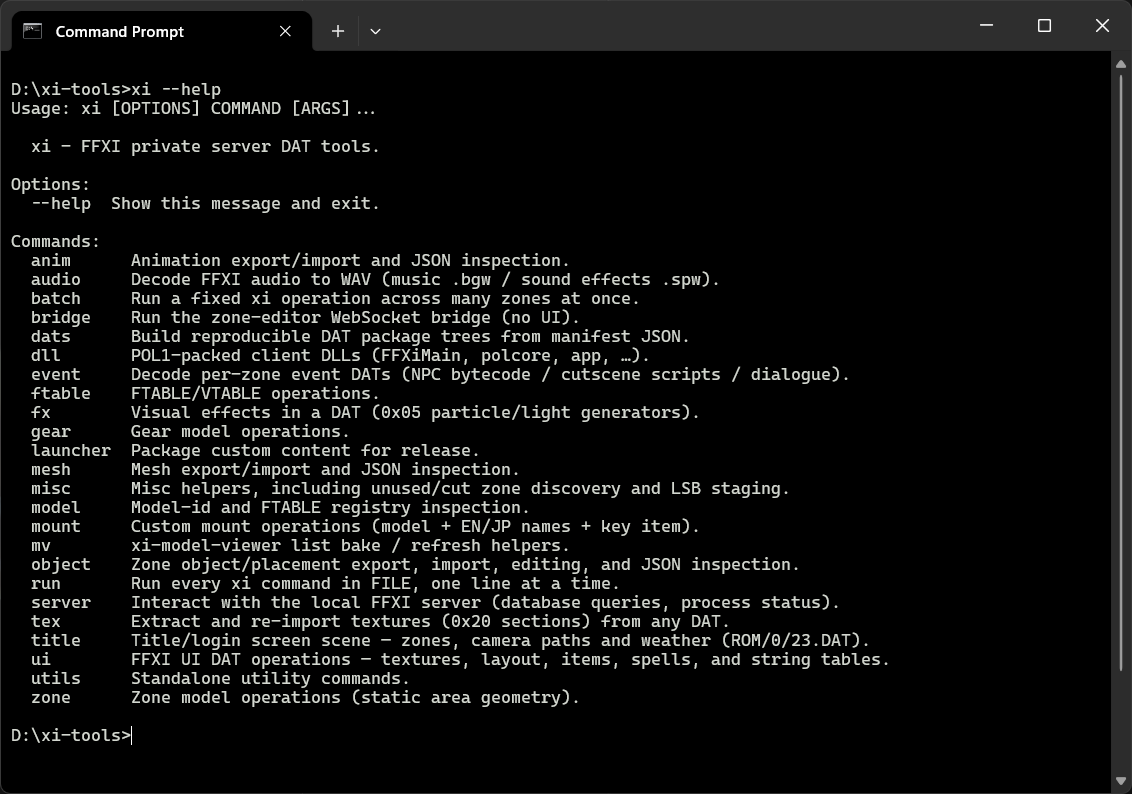
Examples
Fully custom cutscene + mesh + unmirroring + custom anim example:
- https://streamable.com/zmycbm
- https://streamable.com/hvl94c
120 slot inventory patch example:
- https://streamable.com/imxfcy
Fixing dev/prototype zones to work in-game:
- https://streamable.com/vfy8fd
- https://streamable.com/gj5tph
Zones:
- https://github.com/vekien/xi-tools/blob/main/examples/1.png (Dev Zone)
- https://github.com/vekien/xi-tools/blob/main/examples/2.png (Character creation zone)
- https://github.com/vekien/xi-tools/blob/main/examples/5.png (my own first test)
Start Screen:
- https://github.com/vekien/xi-tools/blob/main/examples/4.png (HD images, moved UI, removed Create character button, removed gobby bags)
XI Zone Editor
- Github: https://github.com/vekien/xi-zone-editor
- Example: Custom Mog House - https://youtu.be/hc9Fp7aFUWE?si=tWUY2nPPf5yDtp4C
- Example: Custom zone from scratch (early dev) - https://youtu.be/PXmo16c4vYg?si=4s3r8VmhACp1cbml
Note: This is still very in-dev, experimental, I do not recommend using on Retail. Use on your own local server or with private server permission. I am saying this so you don't go deleting some collision and forgetting about it!!! This tool was built to be a editor first, it doesn't represent visually how a zone looks in game as it's more about showing placement of objects, cutscene objects, house meshes, and other hidden stuff. The model viewer is more closer to "how it looks" and both can work in tandem.
This tool lets you build completely new zones or edit custom zones, you can bring in 3d models from Blender or anywhere (supporting GLB) and can copy assets across zones, fancy that Rabao tents in Jeuno? go for it! Want some snowy mountains in your mog house? Bring a blanket.
Features
- Desktop level editor for FFXI zones: load a zone DAT, edit it in a 3D viewport, publish back into the game files
- Projects and change-sets: every edit is a saved change-set per zone, with full undo/redo, autosave and version history you can restore from
- Move, rotate and scale placements on a gizmo with snapping, in local or world space
- Copy/paste/delete objects, the clipboard survives zone switches so you can paste objects, vfx, sounds and markers across zones
- Import GLB models as new placements, plus editable text-plane signs that bake into meshes on publish
- Play the zone's own object animations such as windmills and the like spin as they do in-game, and copies keep their animation
- Edit collision: author boxes, planes or meshes with wall/floor and terrain types, strip or reset the baked mesh, or replace it wholesale from an OBJ
- Navmesh generation from collision, with an in-viewport overlay
- Sound and music: emitters with in-editor playback, wav/ogg import, BGM slot assignment with preview, borrowed footstep sounds
- Cutscene authoring with a camera sequencer and keyframes, plus an event actor and dialogue inspector
- Create new zones from templates
- Publish to Standard and HD DATs with a live log. Project packaging for distribution.
- Asset Browser of bundled objects, music, sound effects and monsters, all drag-to-viewport
- Multiple view modes: Edit, read-only View, Live Standard, Live HD and the pristine Backup Base
- The app fetches xi-tools and Python on first run and walks you through setup
And that's all I've got, hopefully some of this is useful for your own dat modding needs, Huge thanks to Aamace as honestly none of this would be possible without XIM. I primarily post in the FFXI Modding discord, so feel free to drop in/DM me.