|
|
[Blackout.Lua] ScreenSaver/OLED protection
 Fenrir.Jinxs Fenrir.Jinxs
Server: Fenrir
Game: FFXI
Posts: 1265
By Fenrir.Jinxs 2026-05-27 09:50:14
Blackout
Blackout is a lightweight utility addon designed to prevent screen burn-in, and manage your game client when you step away from the keyboard.
https://github.com/State-Null
old:
What It Does & When
Screen Saver Overlay (Default: 5 minutes idle)
After 5 minutes of inactivity, Blackout displays a full-screen solid black overlay to act as a screensaver.
It also automatically toggles the FFXI FPS display off when active and back on when you return, ensuring the screen is completely black.
Auto-Minimize (Default: 10 minutes idle)
After 10 minutes of inactivity, Blackout will automatically minimize the game client to the Windows taskbar using Windower's built-in minimization command.
Any activation includes a timestamp (Activated, Minimized, Deactivated)
Smart Inactivity Detection
The idle timer automatically resets upon any keyboard input or mouse movement.
It tracks character coordinates ($X$, $Y$, $Z$) and camera facing direction, so auto-running, getting moved, or panning the camera will keep you marked as active.
It automatically halts idle timers if you are in combat or dead (so the screen won't go black in the middle of a fight or while waiting for a raise).
Commands
//blackout / //blackout toggle - Manually activate/deactivate the screensaver.
//blackout auto [on|off] - Enable or disable the automatic idle screensaver.
//blackout timeout [seconds] - Set how long to wait before activating the screensaver (default: 300).
//blackout minimize [on|off] - Enable or disable automatic client minimization (default: on).
//blackout minimizetimeout [seconds] - Set how long to wait before minimizing the game client (default: 600).
//blackout combat [on|off] - Allow/prevent screensaver and minimization while in combat.
//blackout dead [on|off] - Allow/prevent screensaver and minimization while dead.
//blackout fps [on|off] - Enable/disable automatic FPS display toggle when screen saving.
//blackout status - Show all current settings and timers. Code _addon.name = 'Blackout'
_addon.author = 'Jinxs'
_addon.version = '3.0'
_addon.commands = {'blackout'}
local texts = require('texts')
local config = require('config')
-- Localize standard library functions
local math_abs = math.abs
local math_pi = math.pi
local os_clock = os.clock
local os_date = os.date
local os_time = os.time
local string_rep = string.rep
local coroutine_sleep = coroutine.sleep
local coroutine_schedule = coroutine.schedule
-- Localize Windower APIs
local windower_ffxi = windower.ffxi
local windower_add_to_chat = windower.add_to_chat
local windower_send_command = windower.send_command
local windower_get_windower_settings = windower.get_windower_settings
local texts_new = texts.new
math.randomseed(os_time())
-- Constants
local EPSILON = 0.001
local EPSILON_FACING = 0.0001
local TWO_PI = 2 * math_pi
local ACTIVE_SLEEP = 3 -- Check every 3 seconds when screensaver is active for quick gamepad/combat wakeup
local INACTIVE_SLEEP = 10 -- Check every 10 seconds when playing normally (near-zero overhead)
-- Default settings
local defaults = {}
defaults.idle_timeout = 300 -- 5 minutes in seconds
defaults.disable_in_combat = true
defaults.disable_if_dead = true
defaults.show_fps_on_off = true
defaults.auto_enabled = true -- Whether the automatic screensaver is active
defaults.minimize_enabled = true
defaults.minimize_timeout = 600 -- 10 minutes in seconds
local settings = config.load(defaults)
local overlay = nil
local overlay_visible = false
local last_activity_time = os_clock()
local player_id = nil
local last_x, last_y, last_z, last_facing = nil, nil, nil, nil
local minimized_triggered = false
local function get_res()
local s = windower_get_windower_settings()
return s.ui_x_res, s.ui_y_res
end
local function create_overlay()
if overlay then
overlay:destroy()
overlay = nil
end
overlay = texts_new()
local w, h = get_res()
overlay:pos(0, 0)
overlay:size(w, h)
overlay:bg_visible(true)
overlay:bg_color(0, 0, 0)
overlay:bg_alpha(255)
overlay:text(string_rep(" ", 5000))
overlay:draggable(false)
overlay:hide()
overlay_visible = false
end
local function show_overlay()
if overlay and not overlay_visible then
overlay:show()
overlay_visible = true
if settings.show_fps_on_off then
windower_send_command('showfps 0')
end
local timestamp = os_date('%H:%M:%S')
windower_add_to_chat(207, '[Blackout] [' .. timestamp .. '] Screen Saver activated.')
if settings.minimize_enabled then
local delay = settings.minimize_timeout - settings.idle_timeout
if delay <= 0 then
minimized_triggered = true
windower_send_command('game_minimize')
windower_add_to_chat(207, '[Blackout] [' .. timestamp .. '] Game minimized due to inactivity.')
else
coroutine_schedule(function()
if overlay_visible and not minimized_triggered and settings.minimize_enabled then
minimized_triggered = true
windower_send_command('game_minimize')
local min_timestamp = os_date('%H:%M:%S')
windower_add_to_chat(207, '[Blackout] [' .. min_timestamp .. '] Game minimized due to inactivity.')
end
end, delay)
end
end
end
end
local function hide_overlay(triggered_by_user)
if overlay_visible then
if overlay then
overlay:hide()
end
overlay_visible = false
if settings.show_fps_on_off then
windower_send_command('showfps 1')
end
if triggered_by_user then
local timestamp = os_date('%H:%M:%S')
windower_add_to_chat(207, '[Blackout] [' .. timestamp .. '] Screen Saver deactivated.')
end
end
end
local function reset_activity()
minimized_triggered = false
if overlay_visible then
hide_overlay(true)
last_activity_time = os_clock()
else
-- Micro-optimization: Only update timestamp at most once per second
-- to prevent excessive local variable writes during rapid mouse movement.
local now = os_clock()
if now - last_activity_time > 1 then
last_activity_time = now
end
end
end
-- Cache Player ID
local function update_player_id()
local player = windower_ffxi.get_player()
if player then
player_id = player.id
else
player_id = nil
end
end
-- Check character movement/combat status
local function check_game_state()
-- Optimization: Skip all entity queries and math if direct keyboard/mouse inputs
-- were registered in the last INACTIVE_SLEEP seconds. Skip this skip if screensaver is active.
if not overlay_visible and (os_clock() - last_activity_time < INACTIVE_SLEEP) then
return
end
if not player_id then
update_player_id()
end
if not player_id then return end
local player_mob = windower_ffxi.get_mob_by_id(player_id)
if player_mob then
-- Check movement
local current_x = player_mob.x
local current_y = player_mob.y
local current_z = player_mob.z
local current_facing = player_mob.facing
if last_x then
local diff_facing = math_abs(current_facing - last_facing)
if diff_facing > math_pi then
diff_facing = TWO_PI - diff_facing
end
if math_abs(current_x - last_x) > EPSILON or
math_abs(current_y - last_y) > EPSILON or
math_abs(current_z - last_z) > EPSILON or
diff_facing > EPSILON_FACING then
reset_activity()
end
end
last_x = current_x
last_y = current_y
last_z = current_z
last_facing = current_facing
-- Check player status (combat/death) using player_mob.status
-- status 1 is Engaged (combat), status 3 is Dead
if (settings.disable_in_combat and player_mob.status == 1) or
(settings.disable_if_dead and player_mob.status == 3) then
reset_activity()
end
end
end
-- Idle monitoring loop (checks dynamically based on screensaver state)
local function idle_loop()
while true do
local sleep_time = overlay_visible and ACTIVE_SLEEP or INACTIVE_SLEEP
coroutine_sleep(sleep_time)
check_game_state()
-- Check if we should activate the screensaver
if settings.auto_enabled and not overlay_visible and (os_clock() - last_activity_time >= settings.idle_timeout) then
show_overlay()
end
end
end
-- Register Event Listeners for direct user activity
windower.register_event('keyboard', function(dik, pressed, flags, blocked)
if pressed then
reset_activity()
end
end)
windower.register_event('mouse', function(type, x, y, delta, blocked)
-- Any mouse interaction (type 0: movement/drag, 1: left click, etc.)
reset_activity()
end)
windower.register_event('load', function()
create_overlay()
update_player_id()
coroutine_schedule(idle_loop, INACTIVE_SLEEP)
end)
windower.register_event('login', function()
create_overlay()
update_player_id()
end)
windower.register_event('logout', function()
player_id = nil
last_x, last_y, last_z, last_facing = nil, nil, nil, nil
hide_overlay(false)
end)
windower.register_event('unload', function()
hide_overlay(false)
if overlay then
overlay:destroy()
overlay = nil
end
end)
local function print_help()
windower_add_to_chat(207, '[Blackout] Command Help:')
windower_add_to_chat(207, ' //blackout - Toggles the screensaver overlay manually.')
windower_add_to_chat(207, ' //blackout on - Manually activate the screensaver overlay.')
windower_add_to_chat(207, ' //blackout off - Manually deactivate the screensaver overlay.')
windower_add_to_chat(207, ' //blackout auto [on|off] - Enable/disable the automatic idle screensaver.')
windower_add_to_chat(207, ' //blackout timeout [seconds] - Set/view the idle timeout (default 300).')
windower_add_to_chat(207, ' //blackout minimize [on|off] - Enable/disable automatic client minimization.')
windower_add_to_chat(207, ' //blackout minimizetimeout [seconds] - Set/view the minimize timeout (default 600).')
windower_add_to_chat(207, ' //blackout combat [on|off] - Enable/disable screensaver in combat.')
windower_add_to_chat(207, ' //blackout dead [on|off] - Enable/disable screensaver when dead.')
windower_add_to_chat(207, ' //blackout fps [on|off] - Enable/disable FPS display toggle on screen save.')
windower_add_to_chat(207, ' //blackout status - Show current settings and status.')
windower_add_to_chat(207, ' //blackout help - Display this help menu.')
end
windower.register_event('addon command', function(cmd, ...)
cmd = cmd and cmd:lower() or ''
local args = {...}
if cmd == 'on' then
show_overlay()
elseif cmd == 'off' then
hide_overlay(true)
elseif cmd == 'auto' then
local sub_cmd = args[1] and args[1]:lower() or ''
if sub_cmd == 'on' then
settings.auto_enabled = true
config.save(settings)
windower_add_to_chat(207, '[Blackout] Auto screensaver is now ENABLED.')
elseif sub_cmd == 'off' then
settings.auto_enabled = false
config.save(settings)
windower_add_to_chat(207, '[Blackout] Auto screensaver is now DISABLED.')
else
windower_add_to_chat(207, '[Blackout] Auto screensaver is currently ' .. (settings.auto_enabled and 'ENABLED' or 'DISABLED') .. '. Use "//blackout auto on" or "//blackout auto off" to change.')
end
elseif cmd == 'timeout' then
local new_timeout = tonumber(args[1])
if new_timeout and new_timeout > 0 then
settings.idle_timeout = new_timeout
config.save(settings)
windower_add_to_chat(207, '[Blackout] Idle timeout set to ' .. new_timeout .. ' seconds.')
else
windower_add_to_chat(207, '[Blackout] Current idle timeout is ' .. settings.idle_timeout .. ' seconds.')
end
elseif cmd == 'minimize' then
local sub_cmd = args[1] and args[1]:lower() or ''
if sub_cmd == 'on' then
settings.minimize_enabled = true
config.save(settings)
windower_add_to_chat(207, '[Blackout] Idle minimization is now ENABLED.')
elseif sub_cmd == 'off' then
settings.minimize_enabled = false
config.save(settings)
windower_add_to_chat(207, '[Blackout] Idle minimization is now DISABLED.')
else
windower_add_to_chat(207, '[Blackout] Idle minimization is currently ' .. (settings.minimize_enabled and 'ENABLED' or 'DISABLED') .. '. Use "//blackout minimize on" or "//blackout minimize off" to change.')
end
elseif cmd == 'minimizetimeout' or cmd == 'minimize_timeout' then
local new_timeout = tonumber(args[1])
if new_timeout and new_timeout > 0 then
settings.minimize_timeout = new_timeout
config.save(settings)
windower_add_to_chat(207, '[Blackout] Minimize timeout set to ' .. new_timeout .. ' seconds.')
else
windower_add_to_chat(207, '[Blackout] Current minimize timeout is ' .. settings.minimize_timeout .. ' seconds.')
end
elseif cmd == 'combat' then
local sub_cmd = args[1] and args[1]:lower() or ''
if sub_cmd == 'on' then
settings.disable_in_combat = true
config.save(settings)
windower_add_to_chat(207, '[Blackout] Disable in combat is now ENABLED.')
elseif sub_cmd == 'off' then
settings.disable_in_combat = false
config.save(settings)
windower_add_to_chat(207, '[Blackout] Disable in combat is now DISABLED.')
else
windower_add_to_chat(207, '[Blackout] Disable in combat is currently ' .. (settings.disable_in_combat and 'ENABLED' or 'DISABLED') .. '. Use "//blackout combat on" or "//blackout combat off" to change.')
end
elseif cmd == 'dead' then
local sub_cmd = args[1] and args[1]:lower() or ''
if sub_cmd == 'on' then
settings.disable_if_dead = true
config.save(settings)
windower_add_to_chat(207, '[Blackout] Disable if dead is now ENABLED.')
elseif sub_cmd == 'off' then
settings.disable_if_dead = false
config.save(settings)
windower_add_to_chat(207, '[Blackout] Disable if dead is now DISABLED.')
else
windower_add_to_chat(207, '[Blackout] Disable if dead is currently ' .. (settings.disable_if_dead and 'ENABLED' or 'DISABLED') .. '. Use "//blackout dead on" or "//blackout dead off" to change.')
end
elseif cmd == 'fps' then
local sub_cmd = args[1] and args[1]:lower() or ''
if sub_cmd == 'on' then
settings.show_fps_on_off = true
config.save(settings)
windower_add_to_chat(207, '[Blackout] FPS toggle is now ENABLED.')
elseif sub_cmd == 'off' then
settings.show_fps_on_off = false
config.save(settings)
windower_add_to_chat(207, '[Blackout] FPS toggle is now DISABLED.')
else
windower_add_to_chat(207, '[Blackout] FPS toggle is currently ' .. (settings.show_fps_on_off and 'ENABLED' or 'DISABLED') .. '. Use "//blackout fps on" or "//blackout fps off" to change.')
end
elseif cmd == 'status' then
windower_add_to_chat(207, '[Blackout] Status - Auto: ' .. (settings.auto_enabled and 'ON' or 'OFF') .. ', Timeout: ' .. settings.idle_timeout .. 's, Minimize: ' .. (settings.minimize_enabled and 'ON' or 'OFF') .. ', Minimize Timeout: ' .. settings.minimize_timeout .. 's, Disable in Combat: ' .. tostring(settings.disable_in_combat) .. ', Disable if Dead: ' .. tostring(settings.disable_if_dead) .. ', FPS Toggle: ' .. tostring(settings.show_fps_on_off))
elseif cmd == 'help' or cmd == 'h' or cmd == '?' then
print_help()
elseif cmd == '' or cmd == 'toggle' then
-- Toggle manually
if overlay and overlay_visible then
hide_overlay(true)
else
show_overlay()
end
else
windower_add_to_chat(207, '[Blackout] Unknown command: "' .. cmd .. '"')
print_help()
end
end)
[+]


Valefor.Keylesta
Server: Valefor
Game: FFXI
Posts: 233
By Valefor.Keylesta 2026-05-27 10:59:18
Oh man, great minds eh? I just recently upgraded to a new Alienware OLED monitor and started working on a screensaver addon on the side too lol. I got a good chunk of work done on it before I hit a snag and decided to sit on it for a while and work on other stuff (new Bar in the works, don't tell anyone), so this'll be good to have in the meanwhile :D
Valefor.Keylesta
Server: Valefor
Game: FFXI
Posts: 233
By Valefor.Keylesta 2026-05-27 11:05:48
If I may, I suggest adding a setting for the bg_alpha scale. Keep default at 255 but open it up to be adjusted in the settings.xml file.
[+]

By Nuckinfuts 2026-05-27 12:24:26
Going to test this out when I get home. Upgrading to a 5th gen tandem oled this year... definitely going to need this. Thank you!
Fenrir.Jinxs
Server: Fenrir
Game: FFXI
Posts: 1265
By Fenrir.Jinxs 2026-05-27 12:26:55
I wish I knew about the minimize command before I started on this.
added custom bg scale
This has been mostly antigravity built.
old: Code _addon.name = 'Blackout'
_addon.author = 'Jinxs'
_addon.version = '3.0'
_addon.commands = {'blackout'}
local texts = require('texts')
local config = require('config')
-- Localize standard library functions
local math_abs = math.abs
local math_pi = math.pi
local os_clock = os.clock
local os_date = os.date
local os_time = os.time
local string_rep = string.rep
local coroutine_sleep = coroutine.sleep
local coroutine_schedule = coroutine.schedule
-- Localize Windower APIs
local windower_ffxi = windower.ffxi
local windower_add_to_chat = windower.add_to_chat
local windower_send_command = windower.send_command
local windower_get_windower_settings = windower.get_windower_settings
local texts_new = texts.new
math.randomseed(os_time())
-- Constants
local EPSILON = 0.001
local EPSILON_FACING = 0.0001
local TWO_PI = 2 * math_pi
local ACTIVE_SLEEP = 3 -- Check every 3 seconds when screensaver is active for quick gamepad/combat wakeup
local INACTIVE_SLEEP = 10 -- Check every 10 seconds when playing normally (near-zero overhead)
-- Default settings
local defaults = {}
defaults.idle_timeout = 300 -- 5 minutes in seconds
defaults.disable_in_combat = true
defaults.disable_if_dead = true
defaults.show_fps_on_off = true
defaults.auto_enabled = true -- Whether the automatic screensaver is active
defaults.minimize_enabled = true
defaults.minimize_timeout = 600 -- 10 minutes in seconds
defaults.bg_alpha = 255 -- Default background alpha (opacity)
local settings = config.load(defaults)
local overlay = nil
local overlay_visible = false
local last_activity_time = os_clock()
local player_id = nil
local last_x, last_y, last_z, last_facing = nil, nil, nil, nil
local minimized_triggered = false
local function get_res()
local s = windower_get_windower_settings()
return s.ui_x_res, s.ui_y_res
end
local function create_overlay()
if overlay then
overlay:destroy()
overlay = nil
end
overlay = texts_new()
local w, h = get_res()
overlay:pos(0, 0)
overlay:size(w, h)
overlay:bg_visible(true)
overlay:bg_color(0, 0, 0)
overlay:bg_alpha(settings.bg_alpha)
overlay:text(string_rep(" ", 5000))
overlay:draggable(false)
overlay:hide()
overlay_visible = false
end
local function show_overlay()
if overlay and not overlay_visible then
overlay:show()
overlay_visible = true
if settings.show_fps_on_off then
windower_send_command('showfps 0')
end
local timestamp = os_date('%H:%M:%S')
windower_add_to_chat(207, '[Blackout] [' .. timestamp .. '] Screen Saver activated.')
if settings.minimize_enabled then
local delay = settings.minimize_timeout - settings.idle_timeout
if delay <= 0 then
minimized_triggered = true
windower_send_command('game_minimize')
windower_add_to_chat(207, '[Blackout] [' .. timestamp .. '] Game minimized due to inactivity.')
else
coroutine_schedule(function()
if overlay_visible and not minimized_triggered and settings.minimize_enabled then
minimized_triggered = true
windower_send_command('game_minimize')
local min_timestamp = os_date('%H:%M:%S')
windower_add_to_chat(207, '[Blackout] [' .. min_timestamp .. '] Game minimized due to inactivity.')
end
end, delay)
end
end
end
end
local function hide_overlay(triggered_by_user)
if overlay_visible then
if overlay then
overlay:hide()
end
overlay_visible = false
if settings.show_fps_on_off then
windower_send_command('showfps 1')
end
if triggered_by_user then
local timestamp = os_date('%H:%M:%S')
windower_add_to_chat(207, '[Blackout] [' .. timestamp .. '] Screen Saver deactivated.')
end
end
end
local function reset_activity()
minimized_triggered = false
if overlay_visible then
hide_overlay(true)
last_activity_time = os_clock()
else
-- Micro-optimization: Only update timestamp at most once per second
-- to prevent excessive local variable writes during rapid mouse movement.
local now = os_clock()
if now - last_activity_time > 1 then
last_activity_time = now
end
end
end
-- Cache Player ID
local function update_player_id()
local player = windower_ffxi.get_player()
if player then
player_id = player.id
else
player_id = nil
end
end
-- Check character movement/combat status
local function check_game_state()
-- Optimization: Skip all entity queries and math if direct keyboard/mouse inputs
-- were registered in the last INACTIVE_SLEEP seconds. Skip this skip if screensaver is active.
if not overlay_visible and (os_clock() - last_activity_time < INACTIVE_SLEEP) then
return
end
if not player_id then
update_player_id()
end
if not player_id then return end
local player_mob = windower_ffxi.get_mob_by_id(player_id)
if player_mob then
-- Check movement
local current_x = player_mob.x
local current_y = player_mob.y
local current_z = player_mob.z
local current_facing = player_mob.facing
if last_x then
local diff_facing = math_abs(current_facing - last_facing)
if diff_facing > math_pi then
diff_facing = TWO_PI - diff_facing
end
if math_abs(current_x - last_x) > EPSILON or
math_abs(current_y - last_y) > EPSILON or
math_abs(current_z - last_z) > EPSILON or
diff_facing > EPSILON_FACING then
reset_activity()
end
end
last_x = current_x
last_y = current_y
last_z = current_z
last_facing = current_facing
-- Check player status (combat/death) using player_mob.status
-- status 1 is Engaged (combat), status 3 is Dead
if (settings.disable_in_combat and player_mob.status == 1) or
(settings.disable_if_dead and player_mob.status == 3) then
reset_activity()
end
end
end
-- Idle monitoring loop (checks dynamically based on screensaver state)
local function idle_loop()
while true do
local sleep_time = overlay_visible and ACTIVE_SLEEP or INACTIVE_SLEEP
coroutine_sleep(sleep_time)
check_game_state()
-- Check if we should activate the screensaver
if settings.auto_enabled and not overlay_visible and (os_clock() - last_activity_time >= settings.idle_timeout) then
show_overlay()
end
end
end
-- Register Event Listeners for direct user activity
windower.register_event('keyboard', function(dik, pressed, flags, blocked)
if pressed then
reset_activity()
end
end)
windower.register_event('mouse', function(type, x, y, delta, blocked)
-- Any mouse interaction (type 0: movement/drag, 1: left click, etc.)
reset_activity()
end)
windower.register_event('load', function()
create_overlay()
update_player_id()
coroutine_schedule(idle_loop, INACTIVE_SLEEP)
end)
windower.register_event('login', function()
create_overlay()
update_player_id()
end)
windower.register_event('logout', function()
player_id = nil
last_x, last_y, last_z, last_facing = nil, nil, nil, nil
hide_overlay(false)
end)
windower.register_event('unload', function()
hide_overlay(false)
if overlay then
overlay:destroy()
overlay = nil
end
end)
local function print_help()
windower_add_to_chat(207, '[Blackout] Command Help:')
windower_add_to_chat(207, ' //blackout - Toggles the screensaver overlay manually.')
windower_add_to_chat(207, ' //blackout on - Manually activate the screensaver overlay.')
windower_add_to_chat(207, ' //blackout off - Manually deactivate the screensaver overlay.')
windower_add_to_chat(207, ' //blackout auto [on|off] - Enable/disable the automatic idle screensaver.')
windower_add_to_chat(207, ' //blackout timeout [seconds] - Set/view the idle timeout (default 300).')
windower_add_to_chat(207, ' //blackout minimize [on|off] - Enable/disable automatic client minimization.')
windower_add_to_chat(207, ' //blackout minimizetimeout [seconds] - Set/view the minimize timeout (default 600).')
windower_add_to_chat(207, ' //blackout alpha [0-255] - Set screensaver background opacity (default 255).')
windower_add_to_chat(207, ' //blackout combat [on|off] - Enable/disable screensaver in combat.')
windower_add_to_chat(207, ' //blackout dead [on|off] - Enable/disable screensaver when dead.')
windower_add_to_chat(207, ' //blackout fps [on|off] - Enable/disable FPS display toggle on screen save.')
windower_add_to_chat(207, ' //blackout status - Show current settings and status.')
windower_add_to_chat(207, ' //blackout help - Display this help menu.')
end
windower.register_event('addon command', function(cmd, ...)
cmd = cmd and cmd:lower() or ''
local args = {...}
if cmd == 'on' then
show_overlay()
elseif cmd == 'off' then
hide_overlay(true)
elseif cmd == 'auto' then
local sub_cmd = args[1] and args[1]:lower() or ''
if sub_cmd == 'on' then
settings.auto_enabled = true
config.save(settings)
windower_add_to_chat(207, '[Blackout] Auto screensaver is now ENABLED.')
elseif sub_cmd == 'off' then
settings.auto_enabled = false
config.save(settings)
windower_add_to_chat(207, '[Blackout] Auto screensaver is now DISABLED.')
else
windower_add_to_chat(207, '[Blackout] Auto screensaver is currently ' .. (settings.auto_enabled and 'ENABLED' or 'DISABLED') .. '. Use "//blackout auto on" or "//blackout auto off" to change.')
end
elseif cmd == 'timeout' then
local new_timeout = tonumber(args[1])
if new_timeout and new_timeout > 0 then
settings.idle_timeout = new_timeout
config.save(settings)
windower_add_to_chat(207, '[Blackout] Idle timeout set to ' .. new_timeout .. ' seconds.')
else
windower_add_to_chat(207, '[Blackout] Current idle timeout is ' .. settings.idle_timeout .. ' seconds.')
end
elseif cmd == 'minimize' then
local sub_cmd = args[1] and args[1]:lower() or ''
if sub_cmd == 'on' then
settings.minimize_enabled = true
config.save(settings)
windower_add_to_chat(207, '[Blackout] Idle minimization is now ENABLED.')
elseif sub_cmd == 'off' then
settings.minimize_enabled = false
config.save(settings)
windower_add_to_chat(207, '[Blackout] Idle minimization is now DISABLED.')
else
windower_add_to_chat(207, '[Blackout] Idle minimization is currently ' .. (settings.minimize_enabled and 'ENABLED' or 'DISABLED') .. '. Use "//blackout minimize on" or "//blackout minimize off" to change.')
end
elseif cmd == 'minimizetimeout' or cmd == 'minimize_timeout' then
local new_timeout = tonumber(args[1])
if new_timeout and new_timeout > 0 then
settings.minimize_timeout = new_timeout
config.save(settings)
windower_add_to_chat(207, '[Blackout] Minimize timeout set to ' .. new_timeout .. ' seconds.')
else
windower_add_to_chat(207, '[Blackout] Current minimize timeout is ' .. settings.minimize_timeout .. ' seconds.')
end
elseif cmd == 'combat' then
local sub_cmd = args[1] and args[1]:lower() or ''
if sub_cmd == 'on' then
settings.disable_in_combat = true
config.save(settings)
windower_add_to_chat(207, '[Blackout] Disable in combat is now ENABLED.')
elseif sub_cmd == 'off' then
settings.disable_in_combat = false
config.save(settings)
windower_add_to_chat(207, '[Blackout] Disable in combat is now DISABLED.')
else
windower_add_to_chat(207, '[Blackout] Disable in combat is currently ' .. (settings.disable_in_combat and 'ENABLED' or 'DISABLED') .. '. Use "//blackout combat on" or "//blackout combat off" to change.')
end
elseif cmd == 'dead' then
local sub_cmd = args[1] and args[1]:lower() or ''
if sub_cmd == 'on' then
settings.disable_if_dead = true
config.save(settings)
windower_add_to_chat(207, '[Blackout] Disable if dead is now ENABLED.')
elseif sub_cmd == 'off' then
settings.disable_if_dead = false
config.save(settings)
windower_add_to_chat(207, '[Blackout] Disable if dead is now DISABLED.')
else
windower_add_to_chat(207, '[Blackout] Disable if dead is currently ' .. (settings.disable_if_dead and 'ENABLED' or 'DISABLED') .. '. Use "//blackout dead on" or "//blackout dead off" to change.')
end
elseif cmd == 'alpha' or cmd == 'bg_alpha' then
local new_alpha = tonumber(args[1])
if new_alpha and new_alpha >= 0 and new_alpha <= 255 then
settings.bg_alpha = math.floor(new_alpha)
config.save(settings)
if overlay then
overlay:bg_alpha(settings.bg_alpha)
end
windower_add_to_chat(207, '[Blackout] Background alpha set to ' .. settings.bg_alpha .. '.')
else
windower_add_to_chat(207, '[Blackout] Current background alpha is ' .. settings.bg_alpha .. ' (0-255).')
end
elseif cmd == 'fps' then
local sub_cmd = args[1] and args[1]:lower() or ''
if sub_cmd == 'on' then
settings.show_fps_on_off = true
config.save(settings)
windower_add_to_chat(207, '[Blackout] FPS toggle is now ENABLED.')
elseif sub_cmd == 'off' then
settings.show_fps_on_off = false
config.save(settings)
windower_add_to_chat(207, '[Blackout] FPS toggle is now DISABLED.')
else
windower_add_to_chat(207, '[Blackout] FPS toggle is currently ' .. (settings.show_fps_on_off and 'ENABLED' or 'DISABLED') .. '. Use "//blackout fps on" or "//blackout fps off" to change.')
end
elseif cmd == 'status' then
windower_add_to_chat(207, '[Blackout] Status - Auto: ' .. (settings.auto_enabled and 'ON' or 'OFF') .. ', Timeout: ' .. settings.idle_timeout .. 's, Minimize: ' .. (settings.minimize_enabled and 'ON' or 'OFF') .. ', Minimize Timeout: ' .. settings.minimize_timeout .. 's, Alpha: ' .. settings.bg_alpha .. ', Disable in Combat: ' .. tostring(settings.disable_in_combat) .. ', Disable if Dead: ' .. tostring(settings.disable_if_dead) .. ', FPS Toggle: ' .. tostring(settings.show_fps_on_off))
elseif cmd == 'help' or cmd == 'h' or cmd == '?' then
print_help()
elseif cmd == '' or cmd == 'toggle' then
-- Toggle manually
if overlay and overlay_visible then
hide_overlay(true)
else
show_overlay()
end
else
windower_add_to_chat(207, '[Blackout] Unknown command: "' .. cmd .. '"')
print_help()
end
end)
[+]
By DaneBlood 2026-05-27 12:50:02
Blackout
Blackout is a lightweight utility addon designed to prevent screen burn-in, and manage your game client when you step away from the keyboard.
What It Does & When
Screen Saver Overlay (Default: 5 minutes idle)
After 5 minutes of inactivity, Blackout displays a full-screen solid black overlay to act as a screensaver.
What is the use case of this over just... os regular screensaver ?
also what defines inactivity here? is it local to that character/session or global in activity ?
[+]


Fenrir.Jinxs
Server: Fenrir
Game: FFXI
Posts: 1265
By Fenrir.Jinxs 2026-05-27 13:21:27
Blackout
Blackout is a lightweight utility addon designed to prevent screen burn-in, and manage your game client when you step away from the keyboard.
What It Does & When
Screen Saver Overlay (Default: 5 minutes idle)
After 5 minutes of inactivity, Blackout displays a full-screen solid black overlay to act as a screensaver.
What is the use case of this over just... os regular screensaver ?
also what defines inactivity here? is it local to that character/session or global in activity ?
So I frequently would leave my game running and now being a active parent its worse because sometimes I'll leave for unknown periods.
I am weird I use it as bordless window centered in my screen without using the full resolution.
If I don't minimize the game or click somewhere else windows never activates the screen saver.
Don't know if anyone else has this problem but this is designed to be as lightweight as possible as an insurance measure.
I now have a nice burn in of "Weapons:" because it was set to 255 default.
Smart Inactivity Detection
The idle timer automatically resets upon any keyboard input or mouse movement.
It tracks character coordinates ($X$, $Y$, $Z$) and camera facing direction, so auto-running, getting moved, or panning the camera will keep you marked as active.
So this catches gamepads.
It automatically halts idle timers if you are in combat or dead (so the screen won't go black in the middle of a fight or while waiting for a raise).
It checks in every 10 seconds to try and minimize polling as much as possible
When its active (the screen saver/minimized) it does it every 3 seconds, so that its responsive.
Addon only applies to the character the lua is running on.
Shiva.Thorny
Server: Shiva
Game: FFXI
Posts: 4087
By Shiva.Thorny 2026-05-27 13:25:25
What is the use case of this over just... os regular screensaver ? About what I'm thinking here. Why would you want to black out a single ffxi instance while leaving the rest of your desktop on? Why wouldn't you just configure windows to still be able to use screensaver with FFXI running? If you *must* give FFXI exclusive access to the device and trigger from within FFXI, you could just as easily send a signal to turn off the monitor using any of dozens of existing utilities.
I know you said OLED, but keep in mind that people may not always know the difference. Many kinds of monitors (not true OLED) will still leave the backlight on when run this way, while they wouldn't when using a more standard method.
Probably also something to be said about AI slop, given it's taking 400 lines to do a basic task like this.
3 second poll interval for activation is horrible UX. Poll should be designed to be cheap enough to occur once a frame so it instantly snaps on when the user returns. You're not even powering down hardware and your delay is worse than many monitor turnon times.
[+]

Fenrir.Jinxs
Server: Fenrir
Game: FFXI
Posts: 1265
By Fenrir.Jinxs 2026-05-27 13:54:56
I started writing this when I didn't know about the minimize command available.
I left in the blackout overlay just because, the real benefit for me is the minimize command someone told me about today.
Truly turning off the monitor triggers a resize which is not ideal.
As for why the screen saver never activates for me with the game up I never really figured out. Having a webpage open as the active window does, so lazy ai slop is getting the job done in this case.
I have removed the 3 second poll
That is a great suggestion, once I understood it lol
Thank you
old: Code _addon.name = 'Blackout'
_addon.author = 'Jinxs'
_addon.version = '3.0'
_addon.commands = {'blackout'}
local texts = require('texts')
local config = require('config')
-- Localize standard library functions
local math_abs = math.abs
local math_pi = math.pi
local os_clock = os.clock
local os_date = os.date
local os_time = os.time
local string_rep = string.rep
local coroutine_sleep = coroutine.sleep
local coroutine_schedule = coroutine.schedule
-- Localize Windower APIs
local windower_ffxi = windower.ffxi
local windower_add_to_chat = windower.add_to_chat
local windower_send_command = windower.send_command
local windower_get_windower_settings = windower.get_windower_settings
local texts_new = texts.new
math.randomseed(os_time())
-- Constants
local EPSILON = 0.001
local EPSILON_FACING = 0.0001
local TWO_PI = 2 * math_pi
local INACTIVE_SLEEP = 10 -- Check every 10 seconds when playing normally (near-zero overhead)
-- Default settings
local defaults = {}
defaults.idle_timeout = 300 -- 5 minutes in seconds
defaults.disable_in_combat = true
defaults.disable_if_dead = true
defaults.show_fps_on_off = true
defaults.auto_enabled = true -- Whether the automatic screensaver is active
defaults.minimize_enabled = true
defaults.minimize_timeout = 600 -- 10 minutes in seconds
defaults.bg_alpha = 255 -- Default background alpha (opacity)
local settings = config.load(defaults)
local overlay = nil
local overlay_visible = false
local last_activity_time = os_clock()
local player_id = nil
local last_x, last_y, last_z, last_facing = nil, nil, nil, nil
local minimized_triggered = false
local function get_res()
local s = windower_get_windower_settings()
return s.ui_x_res, s.ui_y_res
end
local function create_overlay()
if overlay then
overlay:destroy()
overlay = nil
end
overlay = texts_new()
local w, h = get_res()
overlay:pos(0, 0)
overlay:size(w, h)
overlay:bg_visible(true)
overlay:bg_color(0, 0, 0)
overlay:bg_alpha(settings.bg_alpha)
overlay:text(string_rep(" ", 5000))
overlay:draggable(false)
overlay:hide()
overlay_visible = false
end
local function show_overlay()
if overlay and not overlay_visible then
overlay:show()
overlay_visible = true
if settings.show_fps_on_off then
windower_send_command('showfps 0')
end
local timestamp = os_date('%H:%M:%S')
windower_add_to_chat(207, '[Blackout] [' .. timestamp .. '] Screen Saver activated.')
if settings.minimize_enabled then
local delay = settings.minimize_timeout - settings.idle_timeout
if delay <= 0 then
minimized_triggered = true
windower_send_command('game_minimize')
windower_add_to_chat(207, '[Blackout] [' .. timestamp .. '] Game minimized due to inactivity.')
else
coroutine_schedule(function()
if overlay_visible and not minimized_triggered and settings.minimize_enabled then
minimized_triggered = true
windower_send_command('game_minimize')
local min_timestamp = os_date('%H:%M:%S')
windower_add_to_chat(207, '[Blackout] [' .. min_timestamp .. '] Game minimized due to inactivity.')
end
end, delay)
end
end
end
end
local function hide_overlay(triggered_by_user)
if overlay_visible then
if overlay then
overlay:hide()
end
overlay_visible = false
if settings.show_fps_on_off then
windower_send_command('showfps 1')
end
if triggered_by_user then
local timestamp = os_date('%H:%M:%S')
windower_add_to_chat(207, '[Blackout] [' .. timestamp .. '] Screen Saver deactivated.')
end
end
end
local function reset_activity()
minimized_triggered = false
if overlay_visible then
hide_overlay(true)
last_activity_time = os_clock()
else
-- Micro-optimization: Only update timestamp at most once per second
-- to prevent excessive local variable writes during rapid mouse movement.
local now = os_clock()
if now - last_activity_time > 1 then
last_activity_time = now
end
end
end
-- Cache Player ID
local function update_player_id()
local player = windower_ffxi.get_player()
if player then
player_id = player.id
else
player_id = nil
end
end
-- Check character movement/combat status
local function check_game_state()
if not player_id then
update_player_id()
end
if not player_id then return end
local player_mob = windower_ffxi.get_mob_by_id(player_id)
if player_mob then
-- Check movement
local current_x = player_mob.x
local current_y = player_mob.y
local current_z = player_mob.z
local current_facing = player_mob.facing
if last_x then
local diff_facing = math_abs(current_facing - last_facing)
if diff_facing > math_pi then
diff_facing = TWO_PI - diff_facing
end
if math_abs(current_x - last_x) > EPSILON or
math_abs(current_y - last_y) > EPSILON or
math_abs(current_z - last_z) > EPSILON or
diff_facing > EPSILON_FACING then
reset_activity()
end
end
last_x = current_x
last_y = current_y
last_z = current_z
last_facing = current_facing
-- Check player status (combat/death) using player_mob.status
-- status 1 is Engaged (combat), status 3 is Dead
if (settings.disable_in_combat and player_mob.status == 1) or
(settings.disable_if_dead and player_mob.status == 3) then
reset_activity()
end
end
end
-- Idle monitoring loop (checks dynamically based on screensaver state)
local function idle_loop()
while true do
coroutine_sleep(INACTIVE_SLEEP)
if not overlay_visible then
check_game_state()
-- Check if we should activate the screensaver
if settings.auto_enabled and (os_clock() - last_activity_time >= settings.idle_timeout) then
show_overlay()
end
end
end
end
-- Register Event Listeners for direct user activity
windower.register_event('keyboard', function(dik, pressed, flags, blocked)
if pressed then
reset_activity()
end
end)
windower.register_event('mouse', function(type, x, y, delta, blocked)
-- Any mouse interaction (type 0: movement/drag, 1: left click, etc.)
reset_activity()
end)
windower.register_event('prerender', function()
if overlay_visible then
check_game_state()
end
end)
windower.register_event('load', function()
create_overlay()
update_player_id()
coroutine_schedule(idle_loop, INACTIVE_SLEEP)
end)
windower.register_event('login', function()
create_overlay()
update_player_id()
end)
windower.register_event('logout', function()
player_id = nil
last_x, last_y, last_z, last_facing = nil, nil, nil, nil
hide_overlay(false)
end)
windower.register_event('unload', function()
hide_overlay(false)
if overlay then
overlay:destroy()
overlay = nil
end
end)
local function print_help()
windower_add_to_chat(207, '[Blackout] Command Help:')
windower_add_to_chat(207, ' //blackout - Toggles the screensaver overlay manually.')
windower_add_to_chat(207, ' //blackout on - Manually activate the screensaver overlay.')
windower_add_to_chat(207, ' //blackout off - Manually deactivate the screensaver overlay.')
windower_add_to_chat(207, ' //blackout auto [on|off] - Enable/disable the automatic idle screensaver.')
windower_add_to_chat(207, ' //blackout timeout [seconds] - Set/view the idle timeout (default 300).')
windower_add_to_chat(207, ' //blackout minimize [on|off] - Enable/disable automatic client minimization.')
windower_add_to_chat(207, ' //blackout minimizetimeout [seconds] - Set/view the minimize timeout (default 600).')
windower_add_to_chat(207, ' //blackout alpha [0-255] - Set screensaver background opacity (default 255).')
windower_add_to_chat(207, ' //blackout combat [on|off] - Enable/disable screensaver in combat.')
windower_add_to_chat(207, ' //blackout dead [on|off] - Enable/disable screensaver when dead.')
windower_add_to_chat(207, ' //blackout fps [on|off] - Enable/disable FPS display toggle on screen save.')
windower_add_to_chat(207, ' //blackout status - Show current settings and status.')
windower_add_to_chat(207, ' //blackout help - Display this help menu.')
end
windower.register_event('addon command', function(cmd, ...)
cmd = cmd and cmd:lower() or ''
local args = {...}
if cmd == 'on' then
show_overlay()
elseif cmd == 'off' then
hide_overlay(true)
elseif cmd == 'auto' then
local sub_cmd = args[1] and args[1]:lower() or ''
if sub_cmd == 'on' then
settings.auto_enabled = true
config.save(settings)
windower_add_to_chat(207, '[Blackout] Auto screensaver is now ENABLED.')
elseif sub_cmd == 'off' then
settings.auto_enabled = false
config.save(settings)
windower_add_to_chat(207, '[Blackout] Auto screensaver is now DISABLED.')
else
windower_add_to_chat(207, '[Blackout] Auto screensaver is currently ' .. (settings.auto_enabled and 'ENABLED' or 'DISABLED') .. '. Use "//blackout auto on" or "//blackout auto off" to change.')
end
elseif cmd == 'timeout' then
local new_timeout = tonumber(args[1])
if new_timeout and new_timeout > 0 then
settings.idle_timeout = new_timeout
config.save(settings)
windower_add_to_chat(207, '[Blackout] Idle timeout set to ' .. new_timeout .. ' seconds.')
else
windower_add_to_chat(207, '[Blackout] Current idle timeout is ' .. settings.idle_timeout .. ' seconds.')
end
elseif cmd == 'minimize' then
local sub_cmd = args[1] and args[1]:lower() or ''
if sub_cmd == 'on' then
settings.minimize_enabled = true
config.save(settings)
windower_add_to_chat(207, '[Blackout] Idle minimization is now ENABLED.')
elseif sub_cmd == 'off' then
settings.minimize_enabled = false
config.save(settings)
windower_add_to_chat(207, '[Blackout] Idle minimization is now DISABLED.')
else
windower_add_to_chat(207, '[Blackout] Idle minimization is currently ' .. (settings.minimize_enabled and 'ENABLED' or 'DISABLED') .. '. Use "//blackout minimize on" or "//blackout minimize off" to change.')
end
elseif cmd == 'minimizetimeout' or cmd == 'minimize_timeout' then
local new_timeout = tonumber(args[1])
if new_timeout and new_timeout > 0 then
settings.minimize_timeout = new_timeout
config.save(settings)
windower_add_to_chat(207, '[Blackout] Minimize timeout set to ' .. new_timeout .. ' seconds.')
else
windower_add_to_chat(207, '[Blackout] Current minimize timeout is ' .. settings.minimize_timeout .. ' seconds.')
end
elseif cmd == 'combat' then
local sub_cmd = args[1] and args[1]:lower() or ''
if sub_cmd == 'on' then
settings.disable_in_combat = true
config.save(settings)
windower_add_to_chat(207, '[Blackout] Disable in combat is now ENABLED.')
elseif sub_cmd == 'off' then
settings.disable_in_combat = false
config.save(settings)
windower_add_to_chat(207, '[Blackout] Disable in combat is now DISABLED.')
else
windower_add_to_chat(207, '[Blackout] Disable in combat is currently ' .. (settings.disable_in_combat and 'ENABLED' or 'DISABLED') .. '. Use "//blackout combat on" or "//blackout combat off" to change.')
end
elseif cmd == 'dead' then
local sub_cmd = args[1] and args[1]:lower() or ''
if sub_cmd == 'on' then
settings.disable_if_dead = true
config.save(settings)
windower_add_to_chat(207, '[Blackout] Disable if dead is now ENABLED.')
elseif sub_cmd == 'off' then
settings.disable_if_dead = false
config.save(settings)
windower_add_to_chat(207, '[Blackout] Disable if dead is now DISABLED.')
else
windower_add_to_chat(207, '[Blackout] Disable if dead is currently ' .. (settings.disable_if_dead and 'ENABLED' or 'DISABLED') .. '. Use "//blackout dead on" or "//blackout dead off" to change.')
end
elseif cmd == 'alpha' or cmd == 'bg_alpha' then
local new_alpha = tonumber(args[1])
if new_alpha and new_alpha >= 0 and new_alpha <= 255 then
settings.bg_alpha = math.floor(new_alpha)
config.save(settings)
if overlay then
overlay:bg_alpha(settings.bg_alpha)
end
windower_add_to_chat(207, '[Blackout] Background alpha set to ' .. settings.bg_alpha .. '.')
else
windower_add_to_chat(207, '[Blackout] Current background alpha is ' .. settings.bg_alpha .. ' (0-255).')
end
elseif cmd == 'fps' then
local sub_cmd = args[1] and args[1]:lower() or ''
if sub_cmd == 'on' then
settings.show_fps_on_off = true
config.save(settings)
windower_add_to_chat(207, '[Blackout] FPS toggle is now ENABLED.')
elseif sub_cmd == 'off' then
settings.show_fps_on_off = false
config.save(settings)
windower_add_to_chat(207, '[Blackout] FPS toggle is now DISABLED.')
else
windower_add_to_chat(207, '[Blackout] FPS toggle is currently ' .. (settings.show_fps_on_off and 'ENABLED' or 'DISABLED') .. '. Use "//blackout fps on" or "//blackout fps off" to change.')
end
elseif cmd == 'status' then
windower_add_to_chat(207, '[Blackout] Status - Auto: ' .. (settings.auto_enabled and 'ON' or 'OFF') .. ', Timeout: ' .. settings.idle_timeout .. 's, Minimize: ' .. (settings.minimize_enabled and 'ON' or 'OFF') .. ', Minimize Timeout: ' .. settings.minimize_timeout .. 's, Alpha: ' .. settings.bg_alpha .. ', Disable in Combat: ' .. tostring(settings.disable_in_combat) .. ', Disable if Dead: ' .. tostring(settings.disable_if_dead) .. ', FPS Toggle: ' .. tostring(settings.show_fps_on_off))
elseif cmd == 'help' or cmd == 'h' or cmd == '?' then
print_help()
elseif cmd == '' or cmd == 'toggle' then
-- Toggle manually
if overlay and overlay_visible then
hide_overlay(true)
else
show_overlay()
end
else
windower_add_to_chat(207, '[Blackout] Unknown command: "' .. cmd .. '"')
print_help()
end
end)
By DaneBlood 2026-05-27 16:09:29
So I frequently would leave my game running and now being a active parent its worse because sometimes I'll leave for unknown periods.
You didnt answer the question.
How does the screensaver we have had available for decades not solve this problem already?
By DaneBlood 2026-05-27 16:16:03
yes fyi i use one line of ahk code
SendMessage, 0x112, 0xF170, 2,, Program Manager ; 0x112 is WM_SYSCOMMAND, 0xF170 is SC_MONITORPOWER
This tells windows to shut off the signal to monitor
no resizing.
---
From my perspective (and i could be wrong)
It seems that instead of configuring you computer correctly to just work like its supposed to you are making a patch solution inside ffxi, for a broken computer setup
Just fix your computer. It had screensavers built in into it for decades
Fenrir.Jinxs
Server: Fenrir
Game: FFXI
Posts: 1265
By Fenrir.Jinxs 2026-05-27 16:20:29
So I frequently would leave my game running and now being a active parent its worse because sometimes I'll leave for unknown periods.
You didnt answer the question.
How does the screensaver we have had available for decades not solve this problem already?
Game active window = no screen saver
Idk how much clearer I can make that
That is a cool line though definitely saving that for future use.
By DaneBlood 2026-05-27 17:11:09
Game active window = no screen saver
Idk how much clearer I can make that
That is a cool line though definitely saving that for future use.
I didnt catch this the first time
and I just tested and I can verify the behavior on windows 11.
Im pretty sure it worked on windows 7 but..thats just by memory
This most likely means the process is pulling a power flag to preserve access to monitor. i use this for my my programs that takes alot of time to run iu pull the require system flag so the system will NOT go stand by while my program is doing its task (only the screen)
This might have set requirements to screen.
This might be something that the Windower teams might want to "fix" then to handle it more directly. Because that seems like an unwanted behavior
is this happening with windower or also just regular pol ?
[+]
By DaneBlood 2026-05-27 17:18:06
I can confirm this happens for screenstandby as well.
making me believe even more its one of the powerstates/requirments flags.
[+]
By DaneBlood 2026-05-27 17:30:59
adding in some documentation
https://learn.microsoft.com/en-us/windows/win32/api/winbase/nf-winbase-setthreadexecutionstate
Tgis is what i belive is the issue
The game set its SetThreadExecutionState to 0x80000002 where maybe we really just want 0x80000001, as long as the window is the active window
--- BUT ---
I ran a quick check
C:\Windows\System32>timeout /t 10
Waiting for 0 seconds, press a key to continue ...
C:\Windows\System32>Powercfg /requests
DISPLAY:
None.
no pol is requesting the display prevention. only system.
so it must be doing something else to prevent standby
[+]
By Draylo 2026-05-27 19:29:53
I usually just alt tab to chrome and it goes to the screen saver after a bit
By Chimerawizard 2026-05-27 20:35:20
I have a black background for my desktop.
I just win+tab, Desktop2. everything is black except the mouse and taskbar.
click anywhere on the Desktop2 for the taskbar to auto-hide, then drag the mouse off the right side of the screen.
am i doing it wrong?
I have come into a completely dark room at night, grab the remote, turn on the OLED and oops, that turned it off: has happened multiple times.
By DaneBlood 2026-05-27 23:14:46
I have a black background for my desktop.
I just win+tab, Desktop2. everything is black except the mouse and taskbar.
click anywhere on the Desktop2 for the taskbar to auto-hide, then drag the mouse off the right side of the screen.
am i doing it wrong?
I have come into a completely dark room at night, grab the remote, turn on the OLED and oops, that turned it off: has happened multiple times.
i would argue if you are alt tabbing then why not just have a hotkey to turn of the monitor ?
saves power/heat
By Dodik 2026-05-28 06:49:21
Don't all video card using games in foreground cause screensaver to be disabled? All my games do this.
Acting like there is some special sauce making windower stop screensaver or w/e. What are you even on about.
By DaneBlood 2026-05-28 10:11:13
Don't all video card using games in foreground cause screensaver to be disabled? All my games do this.
Acting like there is some special sauce making windower stop screensaver or w/e. What are you even on about.
Im not sure if you missed this but there IS literally "secret sauce" to handle standby prevention
https://learn.microsoft.com/en-us/windows/win32/api/winbase/nf-winbase-setthreadexecutionstate
and it has nothing to do with the videocard.
This is often used by media players to let windows know not to use screenstandby while its playing a movie.
By Dodik 2026-05-28 10:30:36
I'm aware. What does that have to do with games.
All games as a foreground process stop screensaver from running.
The issue isn't windower or pol. Just more poor understanding of basic functionality.
I'm sure there's some Ms resource you could cite.
By DaneBlood 2026-05-28 22:07:02
I'm aware. What does that have to do with games.
All games as a foreground process stop screensaver from running.
The issue isn't windower or pol. Just more poor understanding of basic functionality.
I'm sure there's some Ms resource you could cite.
Last time I tried to explain the underlying mechanics of what we where talking about you had a temper tantrum.
Is this going to be the same this time or are you actually asking to understand why looking into how things works might help solve it?
By DaneBlood 2026-05-28 22:16:56
For Jinx
Since the worry is OLED burnin, I think (opinion) that blacking out ffxi is not the optimal solution since it only takes care off FFXI.
So I made this for you in Autohotkey
https://gofile.io/d/xFe9Mz
Called it Gsaver (Because everything with gaming has to have G in it)
Bassicaly it just sit and monitor for kb/mouse idle time and when its over the set time interval either shutdown you monitors or call the windows built in blank screensaver
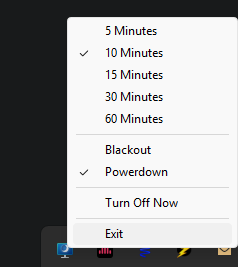
I have fixed my computer so nothing changes when they are powered down aka no resizing not dekstop icons moving around.
However it does not appears that that s the case for you so i put in the blackout option as well
once I can remember the fix for the resizing when monitor are powered off. I will dump that here as well
OH and it can also be trigger with the Hotkey Win + Z
[+]
Fenrir.Jinxs
Server: Fenrir
Game: FFXI
Posts: 1265
By Fenrir.Jinxs 2026-05-29 16:43:26
I actually started using your code you posted earlier as well with a hotkey, though muscle memory hasn't caught up yet.
https://github.com/State-Null/Monitor-off-script/tree/main
While this script wont capture gamepad input it will capture my keyboard hotkeys on the controller resetting the time.
About to redo all my code posts.
[+]

By DaneBlood 2026-05-29 19:57:24
I actually started using your code you posted earlier as well with a hotkey, though muscle memory hasn't caught up yet.
https://github.com/State-Null/Monitor-off-script/tree/main
While this script wont capture gamepad input it will capture my keyboard hotkeys on the controller resetting the time.
About to redo all my code posts.
nevermind this comment. I misread the ahk code
Blackout
Blackout is a lightweight utility addon designed to prevent screen burn-in, and manage your game client when you step away from the keyboard.
https://github.com/State-Null
old:
What It Does & When
Screen Saver Overlay (Default: 5 minutes idle)
After 5 minutes of inactivity, Blackout displays a full-screen solid black overlay to act as a screensaver.
It also automatically toggles the FFXI FPS display off when active and back on when you return, ensuring the screen is completely black.
Auto-Minimize (Default: 10 minutes idle)
After 10 minutes of inactivity, Blackout will automatically minimize the game client to the Windows taskbar using Windower's built-in minimization command.
Any activation includes a timestamp (Activated, Minimized, Deactivated)
Smart Inactivity Detection
The idle timer automatically resets upon any keyboard input or mouse movement.
It tracks character coordinates ($X$, $Y$, $Z$) and camera facing direction, so auto-running, getting moved, or panning the camera will keep you marked as active.
It automatically halts idle timers if you are in combat or dead (so the screen won't go black in the middle of a fight or while waiting for a raise).
Commands
//blackout / //blackout toggle - Manually activate/deactivate the screensaver.
//blackout auto [on|off] - Enable or disable the automatic idle screensaver.
//blackout timeout [seconds] - Set how long to wait before activating the screensaver (default: 300).
//blackout minimize [on|off] - Enable or disable automatic client minimization (default: on).
//blackout minimizetimeout [seconds] - Set how long to wait before minimizing the game client (default: 600).
//blackout combat [on|off] - Allow/prevent screensaver and minimization while in combat.
//blackout dead [on|off] - Allow/prevent screensaver and minimization while dead.
//blackout fps [on|off] - Enable/disable automatic FPS display toggle when screen saving.
//blackout status - Show all current settings and timers. Code _addon.name = 'Blackout'
_addon.author = 'Jinxs'
_addon.version = '3.0'
_addon.commands = {'blackout'}
local texts = require('texts')
local config = require('config')
-- Localize standard library functions
local math_abs = math.abs
local math_pi = math.pi
local os_clock = os.clock
local os_date = os.date
local os_time = os.time
local string_rep = string.rep
local coroutine_sleep = coroutine.sleep
local coroutine_schedule = coroutine.schedule
-- Localize Windower APIs
local windower_ffxi = windower.ffxi
local windower_add_to_chat = windower.add_to_chat
local windower_send_command = windower.send_command
local windower_get_windower_settings = windower.get_windower_settings
local texts_new = texts.new
math.randomseed(os_time())
-- Constants
local EPSILON = 0.001
local EPSILON_FACING = 0.0001
local TWO_PI = 2 * math_pi
local ACTIVE_SLEEP = 3 -- Check every 3 seconds when screensaver is active for quick gamepad/combat wakeup
local INACTIVE_SLEEP = 10 -- Check every 10 seconds when playing normally (near-zero overhead)
-- Default settings
local defaults = {}
defaults.idle_timeout = 300 -- 5 minutes in seconds
defaults.disable_in_combat = true
defaults.disable_if_dead = true
defaults.show_fps_on_off = true
defaults.auto_enabled = true -- Whether the automatic screensaver is active
defaults.minimize_enabled = true
defaults.minimize_timeout = 600 -- 10 minutes in seconds
local settings = config.load(defaults)
local overlay = nil
local overlay_visible = false
local last_activity_time = os_clock()
local player_id = nil
local last_x, last_y, last_z, last_facing = nil, nil, nil, nil
local minimized_triggered = false
local function get_res()
local s = windower_get_windower_settings()
return s.ui_x_res, s.ui_y_res
end
local function create_overlay()
if overlay then
overlay:destroy()
overlay = nil
end
overlay = texts_new()
local w, h = get_res()
overlay:pos(0, 0)
overlay:size(w, h)
overlay:bg_visible(true)
overlay:bg_color(0, 0, 0)
overlay:bg_alpha(255)
overlay:text(string_rep(" ", 5000))
overlay:draggable(false)
overlay:hide()
overlay_visible = false
end
local function show_overlay()
if overlay and not overlay_visible then
overlay:show()
overlay_visible = true
if settings.show_fps_on_off then
windower_send_command('showfps 0')
end
local timestamp = os_date('%H:%M:%S')
windower_add_to_chat(207, '[Blackout] [' .. timestamp .. '] Screen Saver activated.')
if settings.minimize_enabled then
local delay = settings.minimize_timeout - settings.idle_timeout
if delay <= 0 then
minimized_triggered = true
windower_send_command('game_minimize')
windower_add_to_chat(207, '[Blackout] [' .. timestamp .. '] Game minimized due to inactivity.')
else
coroutine_schedule(function()
if overlay_visible and not minimized_triggered and settings.minimize_enabled then
minimized_triggered = true
windower_send_command('game_minimize')
local min_timestamp = os_date('%H:%M:%S')
windower_add_to_chat(207, '[Blackout] [' .. min_timestamp .. '] Game minimized due to inactivity.')
end
end, delay)
end
end
end
end
local function hide_overlay(triggered_by_user)
if overlay_visible then
if overlay then
overlay:hide()
end
overlay_visible = false
if settings.show_fps_on_off then
windower_send_command('showfps 1')
end
if triggered_by_user then
local timestamp = os_date('%H:%M:%S')
windower_add_to_chat(207, '[Blackout] [' .. timestamp .. '] Screen Saver deactivated.')
end
end
end
local function reset_activity()
minimized_triggered = false
if overlay_visible then
hide_overlay(true)
last_activity_time = os_clock()
else
-- Micro-optimization: Only update timestamp at most once per second
-- to prevent excessive local variable writes during rapid mouse movement.
local now = os_clock()
if now - last_activity_time > 1 then
last_activity_time = now
end
end
end
-- Cache Player ID
local function update_player_id()
local player = windower_ffxi.get_player()
if player then
player_id = player.id
else
player_id = nil
end
end
-- Check character movement/combat status
local function check_game_state()
-- Optimization: Skip all entity queries and math if direct keyboard/mouse inputs
-- were registered in the last INACTIVE_SLEEP seconds. Skip this skip if screensaver is active.
if not overlay_visible and (os_clock() - last_activity_time < INACTIVE_SLEEP) then
return
end
if not player_id then
update_player_id()
end
if not player_id then return end
local player_mob = windower_ffxi.get_mob_by_id(player_id)
if player_mob then
-- Check movement
local current_x = player_mob.x
local current_y = player_mob.y
local current_z = player_mob.z
local current_facing = player_mob.facing
if last_x then
local diff_facing = math_abs(current_facing - last_facing)
if diff_facing > math_pi then
diff_facing = TWO_PI - diff_facing
end
if math_abs(current_x - last_x) > EPSILON or
math_abs(current_y - last_y) > EPSILON or
math_abs(current_z - last_z) > EPSILON or
diff_facing > EPSILON_FACING then
reset_activity()
end
end
last_x = current_x
last_y = current_y
last_z = current_z
last_facing = current_facing
-- Check player status (combat/death) using player_mob.status
-- status 1 is Engaged (combat), status 3 is Dead
if (settings.disable_in_combat and player_mob.status == 1) or
(settings.disable_if_dead and player_mob.status == 3) then
reset_activity()
end
end
end
-- Idle monitoring loop (checks dynamically based on screensaver state)
local function idle_loop()
while true do
local sleep_time = overlay_visible and ACTIVE_SLEEP or INACTIVE_SLEEP
coroutine_sleep(sleep_time)
check_game_state()
-- Check if we should activate the screensaver
if settings.auto_enabled and not overlay_visible and (os_clock() - last_activity_time >= settings.idle_timeout) then
show_overlay()
end
end
end
-- Register Event Listeners for direct user activity
windower.register_event('keyboard', function(dik, pressed, flags, blocked)
if pressed then
reset_activity()
end
end)
windower.register_event('mouse', function(type, x, y, delta, blocked)
-- Any mouse interaction (type 0: movement/drag, 1: left click, etc.)
reset_activity()
end)
windower.register_event('load', function()
create_overlay()
update_player_id()
coroutine_schedule(idle_loop, INACTIVE_SLEEP)
end)
windower.register_event('login', function()
create_overlay()
update_player_id()
end)
windower.register_event('logout', function()
player_id = nil
last_x, last_y, last_z, last_facing = nil, nil, nil, nil
hide_overlay(false)
end)
windower.register_event('unload', function()
hide_overlay(false)
if overlay then
overlay:destroy()
overlay = nil
end
end)
local function print_help()
windower_add_to_chat(207, '[Blackout] Command Help:')
windower_add_to_chat(207, ' //blackout - Toggles the screensaver overlay manually.')
windower_add_to_chat(207, ' //blackout on - Manually activate the screensaver overlay.')
windower_add_to_chat(207, ' //blackout off - Manually deactivate the screensaver overlay.')
windower_add_to_chat(207, ' //blackout auto [on|off] - Enable/disable the automatic idle screensaver.')
windower_add_to_chat(207, ' //blackout timeout [seconds] - Set/view the idle timeout (default 300).')
windower_add_to_chat(207, ' //blackout minimize [on|off] - Enable/disable automatic client minimization.')
windower_add_to_chat(207, ' //blackout minimizetimeout [seconds] - Set/view the minimize timeout (default 600).')
windower_add_to_chat(207, ' //blackout combat [on|off] - Enable/disable screensaver in combat.')
windower_add_to_chat(207, ' //blackout dead [on|off] - Enable/disable screensaver when dead.')
windower_add_to_chat(207, ' //blackout fps [on|off] - Enable/disable FPS display toggle on screen save.')
windower_add_to_chat(207, ' //blackout status - Show current settings and status.')
windower_add_to_chat(207, ' //blackout help - Display this help menu.')
end
windower.register_event('addon command', function(cmd, ...)
cmd = cmd and cmd:lower() or ''
local args = {...}
if cmd == 'on' then
show_overlay()
elseif cmd == 'off' then
hide_overlay(true)
elseif cmd == 'auto' then
local sub_cmd = args[1] and args[1]:lower() or ''
if sub_cmd == 'on' then
settings.auto_enabled = true
config.save(settings)
windower_add_to_chat(207, '[Blackout] Auto screensaver is now ENABLED.')
elseif sub_cmd == 'off' then
settings.auto_enabled = false
config.save(settings)
windower_add_to_chat(207, '[Blackout] Auto screensaver is now DISABLED.')
else
windower_add_to_chat(207, '[Blackout] Auto screensaver is currently ' .. (settings.auto_enabled and 'ENABLED' or 'DISABLED') .. '. Use "//blackout auto on" or "//blackout auto off" to change.')
end
elseif cmd == 'timeout' then
local new_timeout = tonumber(args[1])
if new_timeout and new_timeout > 0 then
settings.idle_timeout = new_timeout
config.save(settings)
windower_add_to_chat(207, '[Blackout] Idle timeout set to ' .. new_timeout .. ' seconds.')
else
windower_add_to_chat(207, '[Blackout] Current idle timeout is ' .. settings.idle_timeout .. ' seconds.')
end
elseif cmd == 'minimize' then
local sub_cmd = args[1] and args[1]:lower() or ''
if sub_cmd == 'on' then
settings.minimize_enabled = true
config.save(settings)
windower_add_to_chat(207, '[Blackout] Idle minimization is now ENABLED.')
elseif sub_cmd == 'off' then
settings.minimize_enabled = false
config.save(settings)
windower_add_to_chat(207, '[Blackout] Idle minimization is now DISABLED.')
else
windower_add_to_chat(207, '[Blackout] Idle minimization is currently ' .. (settings.minimize_enabled and 'ENABLED' or 'DISABLED') .. '. Use "//blackout minimize on" or "//blackout minimize off" to change.')
end
elseif cmd == 'minimizetimeout' or cmd == 'minimize_timeout' then
local new_timeout = tonumber(args[1])
if new_timeout and new_timeout > 0 then
settings.minimize_timeout = new_timeout
config.save(settings)
windower_add_to_chat(207, '[Blackout] Minimize timeout set to ' .. new_timeout .. ' seconds.')
else
windower_add_to_chat(207, '[Blackout] Current minimize timeout is ' .. settings.minimize_timeout .. ' seconds.')
end
elseif cmd == 'combat' then
local sub_cmd = args[1] and args[1]:lower() or ''
if sub_cmd == 'on' then
settings.disable_in_combat = true
config.save(settings)
windower_add_to_chat(207, '[Blackout] Disable in combat is now ENABLED.')
elseif sub_cmd == 'off' then
settings.disable_in_combat = false
config.save(settings)
windower_add_to_chat(207, '[Blackout] Disable in combat is now DISABLED.')
else
windower_add_to_chat(207, '[Blackout] Disable in combat is currently ' .. (settings.disable_in_combat and 'ENABLED' or 'DISABLED') .. '. Use "//blackout combat on" or "//blackout combat off" to change.')
end
elseif cmd == 'dead' then
local sub_cmd = args[1] and args[1]:lower() or ''
if sub_cmd == 'on' then
settings.disable_if_dead = true
config.save(settings)
windower_add_to_chat(207, '[Blackout] Disable if dead is now ENABLED.')
elseif sub_cmd == 'off' then
settings.disable_if_dead = false
config.save(settings)
windower_add_to_chat(207, '[Blackout] Disable if dead is now DISABLED.')
else
windower_add_to_chat(207, '[Blackout] Disable if dead is currently ' .. (settings.disable_if_dead and 'ENABLED' or 'DISABLED') .. '. Use "//blackout dead on" or "//blackout dead off" to change.')
end
elseif cmd == 'fps' then
local sub_cmd = args[1] and args[1]:lower() or ''
if sub_cmd == 'on' then
settings.show_fps_on_off = true
config.save(settings)
windower_add_to_chat(207, '[Blackout] FPS toggle is now ENABLED.')
elseif sub_cmd == 'off' then
settings.show_fps_on_off = false
config.save(settings)
windower_add_to_chat(207, '[Blackout] FPS toggle is now DISABLED.')
else
windower_add_to_chat(207, '[Blackout] FPS toggle is currently ' .. (settings.show_fps_on_off and 'ENABLED' or 'DISABLED') .. '. Use "//blackout fps on" or "//blackout fps off" to change.')
end
elseif cmd == 'status' then
windower_add_to_chat(207, '[Blackout] Status - Auto: ' .. (settings.auto_enabled and 'ON' or 'OFF') .. ', Timeout: ' .. settings.idle_timeout .. 's, Minimize: ' .. (settings.minimize_enabled and 'ON' or 'OFF') .. ', Minimize Timeout: ' .. settings.minimize_timeout .. 's, Disable in Combat: ' .. tostring(settings.disable_in_combat) .. ', Disable if Dead: ' .. tostring(settings.disable_if_dead) .. ', FPS Toggle: ' .. tostring(settings.show_fps_on_off))
elseif cmd == 'help' or cmd == 'h' or cmd == '?' then
print_help()
elseif cmd == '' or cmd == 'toggle' then
-- Toggle manually
if overlay and overlay_visible then
hide_overlay(true)
else
show_overlay()
end
else
windower_add_to_chat(207, '[Blackout] Unknown command: "' .. cmd .. '"')
print_help()
end
end)
|
|